

If your coaching business still depends on spreadsheets, group chats, and handwritten notes, a missed session or unpaid package can slip through quickly. As your client list grows, you need a clearer way to manage bookings, communication, and follow-up. That is where personal training scheduling software comes in. It can centralize the daily admin that keeps your coaching business running, but only if you choose the right platform for your workflow.
This beginner-friendly listicle explains what to look for before you commit. You will learn what scheduling software actually does, why spreadsheets and chat apps stop working as you grow, and how to match scheduling to how clients really train. We will also cover member management and follow-up, nutrition planning beside training plans, one calendar for sessions, group classes and appointments, client-visible progress tracking, and in-app coach chat. Later sections explore bilingual and niche-ready options such as Dutch, English and HYROX, pricing transparency and realistic monthly budgets, and how to test a platform before you buy. By the end, you will know how to choose a tool that removes daily admin and supports better coaching.
What Personal Training Scheduling Software Actually Does
At its core, personal trainer software handles five jobs: booking sessions, storing member details, sending reminders, sharing training and nutrition plans, and recording progress. A generic calendar app does only the first and keeps no member records. A large gym management suite is built for staffed facilities, not a solo coach working from a phone.
Four tasks should never happen twice by hand: confirming a session, logging a client note, updating a plan, and checking whether a client actually trained. Reminder systems significantly reduce no-show rates in clinical settings, and the same principle applies to personal training. Three disconnected apps lose client context every time you switch tools.
RNB Coaching brings member management, schedules, nutrition, appointments and follow-up into one platform, so trainers work from a single view. The next sections break down what to look for.
Why Spreadsheets and Chat Apps Stop Working as You Grow
The cracks show early. A double booking, a plan sent to the wrong client, a missed session nobody chased, payments living in a separate file: each is a small failure that costs more as your roster grows. Admin time does not scale; it multiplies, because every new client adds another booking, reminder, and follow-up loop.
Scattered communication also erodes trust. A client who cannot find their plan often assumes it was never sent. Health notes spread across private chats are hard to protect, back up, or hand over, especially when they may count as special category data.
Treat the switch as a business decision, not a tech upgrade. Review personal trainer software options against your real workflow, then use a free introductory call at benjamin@rnbcoaching.app to check fit before paying. Next, consider how scheduling should match the way clients actually train.
Scheduling That Matches How Clients Actually Train
Mixed booking types. Confirm the software handles recurring weekly slots, one-off sessions, and last-minute reschedules inside one calendar, not three workarounds.
Realistic gaps. Check availability windows, travel time, and buffer settings, so back-to-back bookings stay feasible when a session runs long.
Automated confirmations. Confirmations and reminders should reach clients on their own, without you sending each message by hand.
Client self-service. Clients should see and manage their upcoming sessions themselves, which cuts the "what time am I in?" messages.
Schedule in the member app. Verify members can open their schedule in the app. RNB Coaching includes training schedules alongside sessions and group classes, and about RNB Coaching explains the platform's coaching focus.
Get scheduling right, and member records plus follow-up become the next thing to consolidate.
Member Management and Follow-Up in One Place
Once booking runs smoothly, the next layer is what you actually know about each person on your calendar. A capable platform stores goals, history, injuries and notes against every member. Set follow-up triggers for missed sessions or clients who have gone quiet, and let the software flag them rather than your memory. Onboarding templates give every new client the same consistent first week, no matter how busy the rest of your schedule looks. A visible weekly list should show exactly who needs a check-in, the follow-up layer RNB Coaching builds into the trainer view of its Jouw coach, jouw ledenportaal. Finally, confirm member records export cleanly, so your data is never trapped in a tool you outgrow.
Nutrition Planning Next to the Training Plan
Member records keep client context in one place. Nutrition planning belongs in that same tool, because clients are more likely to follow advice when the training plan and meals are easy to find in the same place. Look for reusable meal and macro templates you can adapt per client rather than rebuilding each plan from scratch. Confirm clients can view the plan on their phone and log meals during the week. Check that you can see adherence data and adjust the plan between sessions, not only at the next appointment. RNB Coaching includes nutrition plans in its member app, where clients can view training and nutrition in one place via the voor leden page.
Sessions, Group Classes and Appointments on One Calendar
With nutrition and training plans now sitting together, the next test is whether your calendar is equally unified.
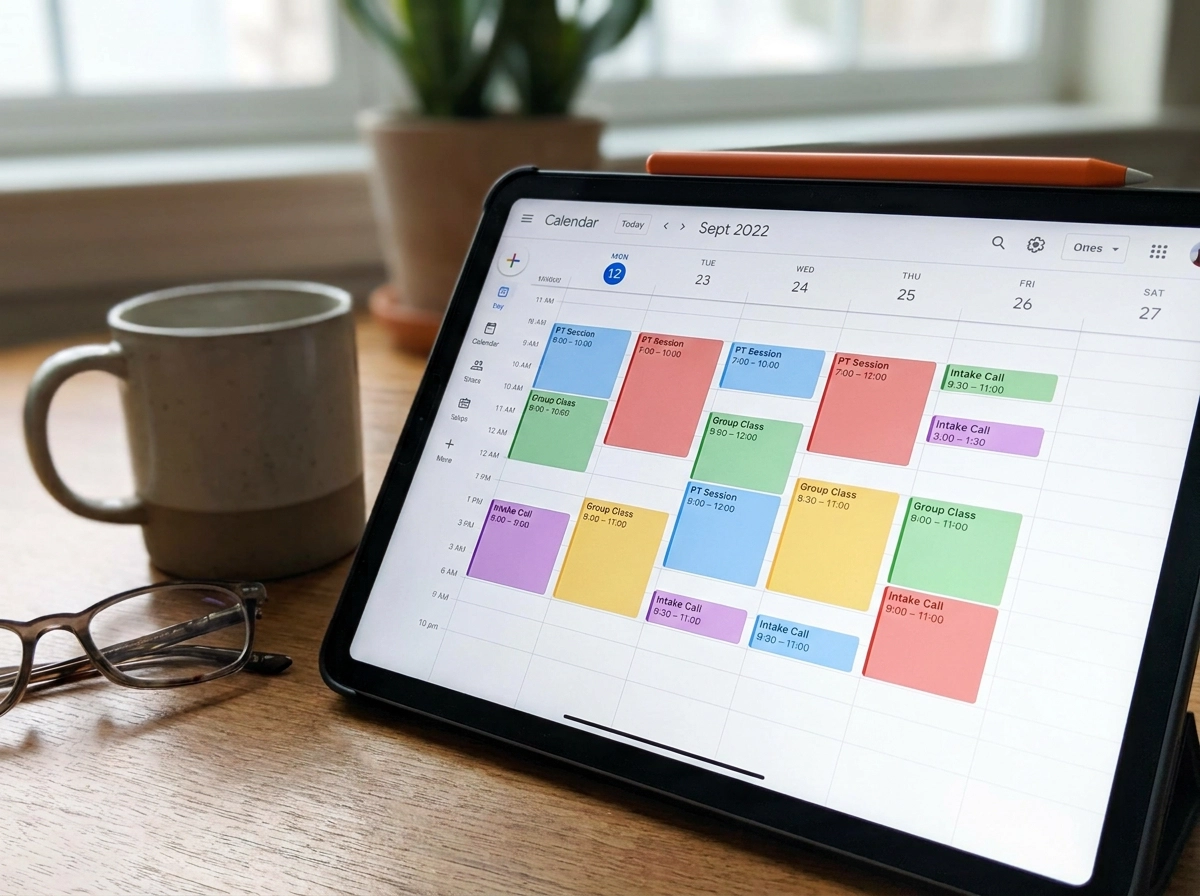
Your personal training scheduling software should hold one-to-one sessions, small group classes and non-training appointments, such as intake calls, in a single view. For group blocks, check that you can set a capacity limit and a waitlist, so a full HYROX-style block stops accepting bookings instead of overbooking.
Because many coaches now run a mix of online and in-person work, confirm the system labels each session type clearly. You should also test whether it flags a conflict before you confirm a booking, not after a client is already at your door.
RNB Coaching handles sessions, group classes and appointments together, which suits trainers who coach both formats.
That central view matters most once clients start tracking their own progress.
Progress Tracking That Clients Can See

With sessions and classes now on one calendar, the next question is what clients get back from that work. Progress tracking should begin with metrics that match your coaching style: weights lifted, session attendance, body measurements, or test results. Pick two or three, not ten. Coaches should insist members can view their own progress, because visible progress is what keeps people paying and showing up. Set a review rhythm, such as a monthly look-back, and let the software remind you to run it. Check that data appears over time rather than as a single snapshot, so trends are obvious. Finally, confirm progress tracking sits in the member app, as it does with RNB Coaching, rather than in a spreadsheet you email out. The right personal training scheduling software makes that record client-facing, not a private file.
Coach Chat and Communication Inside the App
Once clients can see progress in the app, keep the conversation there too. In-app chat keeps messages attached to the member record. Look for one thread where you can send plans, files, and updates without switching platforms. Check notification settings so clients get alerts about sessions and plans without constant noise. Set clear response expectations, such as replies within one business day, and use scheduled messages for routine updates that do not need a reply. RNB Coaching includes coach chat in its member app, keeping conversations where the training plan lives. To confirm how this works for your client volume, use the Mail ons page.
Bilingual and Niche-Ready: Dutch, English and HYROX
With communication settled inside the app, the next filter is fit: does the platform speak your clients' language and match the way you program?
If you coach across Dutch and English, check both the member-facing interface and the onboarding materials. A plan a client cannot read in their own language is a plan they will not follow.
Look for niche fit rather than a generic fitness template. Coaches who program hybrid racing need strength blocks, endurance sessions, and test results tracked together across a long build. Since combining strength and endurance work can blunt lower-body strength gains, tracking both in one place helps you spot when the balance is off, as a 2023 meta-analysis of 59 studies confirmed. A tool that stores them in separate places hides exactly the trend you need to see.
Niche communities also drive referrals. Clients who can watch their progress build tend to share the app with training partners, which turns a specialist tool into a growth channel.
RNB Coaching is a Dutch and English platform used by trainers, coaches, and their members, including HYROX athletes.
Pricing Transparency and Realistic Monthly Budgets
With niche fit settled, budget for the client count you expect in twelve months. Flat monthly fees are predictable, while per-member pricing can look cheaper now and rise as you grow. Add the extras that hide cost: setup charges, payment processing, add-on modules and per-client app seats. Then weigh the subscription against admin hours saved. For a solo business, reclaimed hours are the real unit, because every manual confirmation or plan update is unpaid time. RNB Coaching sets out three tiers: Signature at EUR 49, Prestige at EUR 89 and Élite at EUR 149 per month, excluding VAT. Ask which tier matches your client volume and feature needs, a question a free introductory call is designed to settle. Review Private. Jouw training, op jouw tempo. to understand the member experience before you choose.
How to Test a Platform Before You Commit
Once the numbers look workable, test the personal training scheduling software with your own workflow. Run a two-week trial with real clients, not demo data, and complete one full cycle: booking a session, sharing a training or nutrition plan, and following up afterward.
Do the entire flow on your phone first. Member experience usually decides whether clients actually use the app, so if booking or plan access feels clumsy on mobile, it will fail in practice.
Before you pay, ask three questions: How do I export my data, what happens if I pause my subscription, and how fast is support? Import one month of existing client history to see how painful setup really is.
End the test with a shortlist of one or two tools. Book the free introductory call at benjamin@rnbcoaching.app to compare tiers.
Conclusion: Choose the Tool That Removes Your Daily Admin
Once your test period ends, make the decision from your own week rather than a feature comparison. Choose the personal training scheduling software that removes the tasks you repeat most, which are usually confirmations, plan sharing and follow-up. A member app with schedules, nutrition, progress tracking and coach chat, plus automated reminders, will serve you better than a long list of features you never open.
Then commit to thirty days of real use. At the end, review two numbers: whether client adherence improved and whether your admin time dropped. If both moved, the platform is earning its place.
If RNB Coaching fits, book a free introductory call at benjamin@rnbcoaching.app to choose the right tier.